From a purchase to the next print
Compare filament trackers.
Start with your shelf.
Spoolroom brings intake, supplies and scale readings into one inventory. Its value is in the work you can do with that inventory: review a purchase, find what you need, and keep the balance grounded in a real weigh-in.
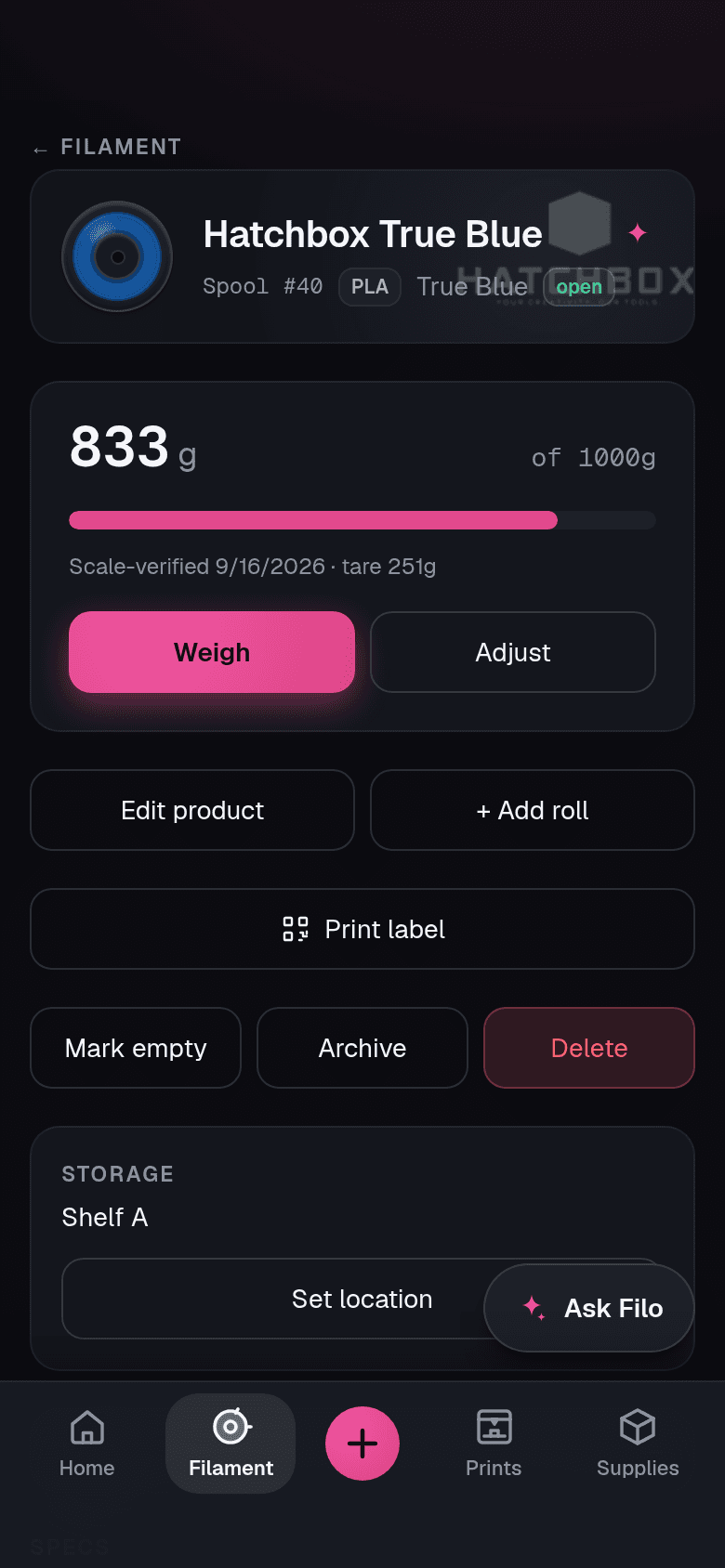
What you can do in Spoolroom
01 · Bring it in
Review, then save
Photograph a spool label to fill the intake form, or import a receipt to prepare its filament purchases. Check matches, quantities and fields before saving.
Receipt matching depends on the store and catalog. Unmatched items need your review; receipt import is for filament.
02 · Know the shelf
Supplies belong here too
Keep quantities for magnets, heat-set inserts and adhesives alongside your filament. Record a restock or what a project used.
Example Filo question: How many heat-set inserts do I have?
Filo reads your inventory, so the answer depends on the records you keep.
03 · Check what remains
Give the scale a say
Enter a net filament weight, or a gross scale reading with a known empty-spool tare. Reconcile the remaining grams and retain the correction in the ledger.
See the weighing workflowPhoto intake and Filo require AI consent and available credits or your own provider key. Free has no included AI credits. Hobbyist includes 250 credits per month; this is an allowance, not unlimited AI.
Optional automatic logging uses a read-only watcher on an always-on device on your network. Confirmed on the Snapmaker U1 and Elegoo Centauri Carbon 2; other listed printers are experimental. Uncertain spool assignments need review. Check your printer and setup.
Different tools, different fits
Choose the workflow you want to keep
Published by Spoolroom. Competitor details come from official documentation, not hands-on testing. Reviewed . A feature we did not verify is unknown, rather than absent.
Choose an alternative. Each card keeps the same decision factor, both tools and their sources together. All three alternatives are available above.
Spoolroom compared with SimplyPrint Filament Manager
Where to start
Add a purchase
- Spoolroom
Review fields from a label photo or the spools from a receipt before saving. AI needs consent and available credits or your own key.
Sources: 1
Keep the balance useful
- Spoolroom
Reweigh a spool to reconcile its balance. Scale readings, print deductions and corrections remain in its ledger.
Sources: 2
What runs at home
- Spoolroom
The app is hosted. Optional read-only watcher runs on an always-on LAN device. Confirmed: Snapmaker U1 and Elegoo Centauri Carbon 2. Other listed printers are experimental.
Sources: 3
Free starting point
All four tools, side by side. If needed, scroll sideways; keyboard users can focus the table area and use the arrow keys. Prices describe the named monthly plans; bundles and limits differ.
| Decision factor | Spoolroom | SimplyPrint Filament Manager | Spoolman | Spoolstock |
|---|---|---|---|---|
| Where to start | A hosted inventory for filament and other supplies, with photo/receipt intake and Filo alongside the shelf. Sources: 1 | A standalone filament tool with locations, drying, weight tracking and labels; also offered within SimplyPrint's printer platform. Sources: 4 | A self-hosted filament database with an API and integrations including Moonraker, OctoPrint and Home Assistant. Sources: 6 | Filament, print and project records on mobile, with a web beta. Spoolie+ AI understands inventory and prints for paid subscribers. |
| Add a purchase | Review fields from a label photo or the spools from a receipt before saving. AI needs consent and available credits or your own key. Sources: 1 | Barcode, QR and NFC tools, plus a filament database. Check the plan for scanning access. | Create spool records using a community filament database; custom fields and QR labels are available. Sources: 6 | Scan packaging from participating manufacturers with Spoolstock Ready. Sources: 8 |
| Keep the balance useful | Reweigh a spool to reconcile its balance. Scale readings, print deductions and corrections remain in its ledger. Sources: 2 | Adjust spool weight and track drying. Connected printing can deduct usage; check printer and plan requirements separately. | Connected integrations update spool weight as printing progresses. Sources: 6 | Creating a print can deduct the filament used from the selected spools. Sources: 7 |
| What runs at home | The app is hosted. Optional read-only watcher runs on an always-on LAN device. Confirmed: Snapmaker U1 and Elegoo Centauri Carbon 2. Other listed printers are experimental. Sources: 3 | Hosted filament tool. Printer management is a separate ecosystem choice; review compatibility before relying on automatic tracking. | Run the web service yourself and connect the integrations suited to your printer setup. Sources: 6 | Mobile apps and a web beta. Automatic printer integration was not verified in the reviewed documentation. |
| Free starting point | 50 active spools and 2 printers. No included AI credits; use your own key or a top-up for AI. Sources: 1 | Up to 50 spools on Free. Paid Filament Manager removes the spool limit. Sources: 4 | MIT-licensed software with no subscription fee; you provide hosting and upkeep. Sources: 6 | First 20 filaments, spools and prints free, as described in the FAQ. Sources: 7 |
Sources and scope
Each source was checked on October 13, 2026. Spoolroom capabilities were also checked against current code. Official descriptions are not independent performance tests. Check the provider before purchasing; prices, regional currency and plan terms can change.
- Spoolroom features and plans — checked
- Spoolroom: weighing and remaining filament — checked
- Spoolroom printer coverage and setup — checked
- SimplyPrint pricing: standalone Filament Manager — checked
- SimplyPrint filament management — checked
- Spoolman official repository and MIT license — checked
- Spoolstock FAQ: prices and print deductions — checked
- Spoolstock Ready: packaging barcode intake — checked
- Spoolstock apps and web beta — checked
- Spoolstock US App Store: Maker Monthly and Spoolie+ AI — checked